


Essential Insights:
- Chromecast production has ceased. After an 11-year run, Google officially stopped manufacturing Chromecast devices in August 2024, though it continues to provide software and security updates for existing units.
- The Google TV Streamer takes the lead. Google’s new flagship streaming device, the Google TV Streamer, offers enhanced storage capacity, quicker processing speeds, and improved integration with smart home ecosystems.
- Numerous alternatives exist. Whether you’re seeking premium performance with the NVIDIA Shield TV Pro or budget-friendly options like Walmart’s Onn 4K Plus, there’s a streaming device tailored to every preference. Other notable contenders include Amazon Fire TV Cube, Roku Ultra, Apple TV 4K, and Xiaomi Mi Box S.
- No one-size-fits-all solution. Selecting the ideal streaming device depends on your specific requirements, preferred ecosystem (Apple, Google, or Amazon), gaming interests, budget constraints, and the importance you place on advanced video and audio technologies.
Google concluded the production of Chromecast devices in August 2024 after selling over 100 million units worldwide. Despite this, the company remains committed to supporting existing Chromecast users with ongoing software and security updates, particularly for the latest models. To fill the void left by Chromecast, Google introduced the Google TV Streamer.
While Chromecast devices can still be found through third-party sellers until stocks run out, users occasionally report connectivity issues. This has prompted many to explore the Google TV Streamer or other streaming device alternatives as viable replacements.
Given the scarcity of new Chromecasts and potential reliability concerns, finding a reputable reseller can be challenging.
If you’re moving away from Chromecast, struggling to locate a trustworthy seller, or just purchased a new TV and are unsure where to begin, I’ve researched 13 streaming devices and shortlisted the top 5 for your consideration.
After hands-on testing of these five Chromecast alternatives-including the NVIDIA Shield TV Pro, Roku Ultra, and Google TV Streamer-I’ve compiled detailed insights to guide your decision. Additionally, I’ve included two more standout options to offer a broader range of features and price points.
Why Look Beyond Chromecast?
Streaming to your television involves wirelessly transmitting media such as videos, music, or photos from your smartphone, tablet, or computer to your TV via Wi-Fi. A streaming device, connected to your TV’s HDMI port, receives this content and displays it on your screen.
Chromecast, developed by Google, plugs into your TV’s HDMI port and uses your home Wi-Fi to stream content from supported apps like Netflix, YouTube, and Spotify, or to mirror your device’s display. Newer Chromecast models, such as those with Google TV, come with a voice-enabled remote and an interactive interface.
Even if your TV includes built-in streaming capabilities, standalone devices like Chromecast often provide enhanced performance and features.
Although Chromecast was a reliable choice for many, here are reasons to consider other options:
- More intuitive interfaces: Several competitors offer simpler, more stable user experiences that some users prefer.
- Expanded app ecosystems and features: Many alternatives support a broader range of applications and unique functionalities that Chromecast lacks.
- Discontinuation concerns: With Chromecast production halted and the Google TV Streamer introduced, acquiring new Chromecasts is increasingly difficult.
- Potential end of updates: While Google promises continued support for existing devices, this may not last indefinitely.
- Cost-effectiveness: There are more affordable streaming devices available that deliver comparable or superior performance.
- Desire for variety: Some users prefer to diversify their streaming setups rather than rely on a single brand or device.
Overview: Top 5 Chromecast Alternatives
| Device | Ideal for | Price | 4K Support | Voice Control |
| NVIDIA Shield TV Pro | Enthusiasts, gamers, local media aficionados | $199.99 | Yes | Yes |
| Amazon Fire TV Cube | Smart home integration and voice command users | $189 | Yes | Yes |
| Roku Ultra | Users seeking simple navigation and universal search | $79.99 | Yes | Yes |
| Google TV Streamer | Fans of Google’s ecosystem | $99.99 | Yes | Yes |
| Onn 4K Plus | Budget-conscious buyers | $29.88 | Yes | Yes |
How I Evaluated These Devices
With numerous streaming devices available, I initially identified 13 promising Chromecast alternatives and then focused on the top 5 based on several criteria:
- Setup simplicity: From unboxing to connecting streaming services, how straightforward was the process?
- Streaming quality: Assessed resolution capabilities (HD, 4K, HDR, Dolby Vision), playback smoothness, and audio-visual fidelity.
- Network performance: Stability of Wi-Fi connections, support for modern standards like Wi-Fi 6/6E, and availability of Ethernet ports.
- Interface responsiveness: Speed of app launches, navigation fluidity, and multitasking efficiency.
- Feature set: Voice assistant integration, remote control functionality, and compatibility with smart home devices.
The five devices I tested thoroughly are:
- NVIDIA Shield TV Pro
- Amazon Fire TV Cube
- Roku Ultra
- Google TV Streamer
- Onn 4K Plus
Detailed Reviews of the Top 5 Chromecast Alternatives
- NVIDIA Shield TV Pro
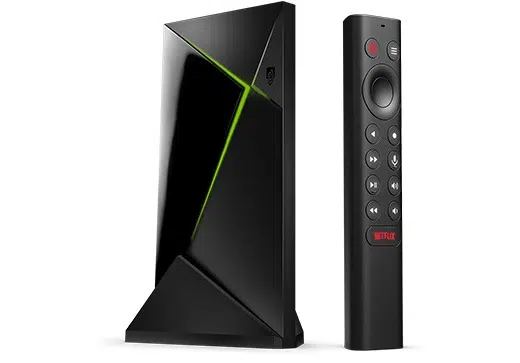
The NVIDIA Shield TV Pro is a powerful Android TV media player featuring built-in Chromecast 4K support. It’s highly regarded among streaming enthusiasts, especially those who prioritize local media playback, gaming, and advanced media server capabilities.
It supports popular streaming platforms like Netflix and YouTube, and its AI-driven upscaling technology enhances lower-resolution videos to near-4K quality using the Tegra X1+ chip.
Notable Features
- Processor: NVIDIA Tegra X1+ with a 256-core GPU, 3 GB RAM, and 16 GB storage.
- Video/Audio: Supports 4K HDR, Dolby Vision, HDR10, AI upscaling, and Dolby Audio.
- Connectivity: Gigabit Ethernet, Bluetooth 5.0, HDMI 2.0b, CEC support, and dual USB 3.0 ports.
- Voice Assistants: Compatible with Google Assistant and Amazon Alexa.
- Remote: Features voice search, backlit buttons, motion activation, and a remote locator.
- Gaming: Supports NVIDIA GeForce NOW cloud gaming and Android games via Google Play.
Setup Guide
- Connect the Shield TV Pro to your TV’s HDMI port and power it on.
- Pair the remote following on-screen prompts.
- Connect to Wi-Fi or Ethernet and verify network stability.
- Sign in with your Google account to access the Play Store.
- Update the software for optimal performance and security.
- Optionally, configure gaming services like GeForce NOW.
Supported Services
- NVIDIA GeForce NOW
- Netflix
- YouTube
- Amazon Prime Video
- Google Play Movies & TV
- Freevee
- Vudu
- Amazon Music
- Google Play Store
- YouTube Music
- PLEX
- Google Play Games
Price
Available for $199.99 via NVIDIA’s official store.
Pros
- Exceptional streaming performance, especially for high-bitrate content.
- Versatile for gaming, local media, and streaming.
- AI upscaling significantly improves video quality.
Cons
- May feel complex for users only interested in basic streaming.
- Larger physical size compared to typical streaming sticks.
Ideal For
- Users with extensive local media collections.
- Those seeking a multi-functional device beyond streaming.
- Viewers who prioritize superior video and audio quality.
Not Ideal For
- Casual streamers wanting a simple, budget-friendly device.
- Amazon Fire TV Cube
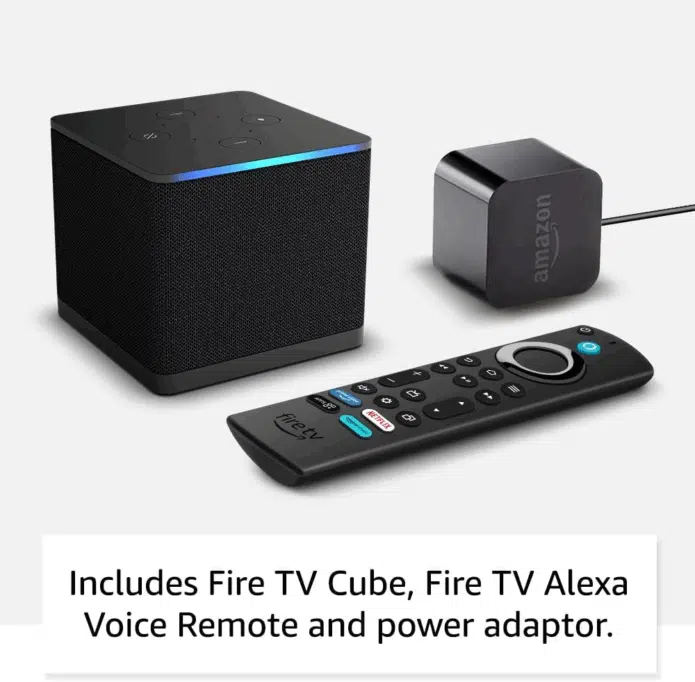
The Amazon Fire TV Cube merges streaming with advanced voice control and smart home management. This compact set-top box supports 4K HDR and Dolby Atmos, with the third generation released in 2022.
Running Fire OS, it allows native app streaming from the Amazon Appstore. Its HDMI input and IR/CEC capabilities enable integration with other devices like cable boxes or gaming consoles. Hands-free Alexa voice control is built-in, allowing remote-free operation.
Key Features
- Hands-free Alexa voice control for TV, soundbars, and smart devices.
- 2 GB RAM and 16 GB storage.
- Octa-core processor with an 800 MHz GPU for swift app performance.
- Wi-Fi 6E, Bluetooth, Ethernet port, HDMI input/output.
- Supports 4K Ultra HD, HDR (including Dolby Vision), and Dolby Atmos audio.
- Cloud gaming via Amazon Luna and Xbox Game Pass.
Setup Instructions
- Place the Cube near your TV, connect power and HDMI cables, including HDMI-in if needed.
- Switch TV input to the Cube and pair the remote.
- Connect to Wi-Fi or Ethernet; allow updates to install.
- Sign in to your Amazon account to access features and the Appstore.
- Install apps and configure audio settings as needed.
Supported Services
Supports major streaming platforms available in your region and cloud gaming services.
Price
Priced at $189 on Amazon, with pre-owned options available.
Advantages
- Hands-free Alexa control enhances convenience.
- Fast user interface and app loading.
- Wi-Fi 6E reduces network congestion and latency.
- HDMI input allows integration of multiple devices.
- Includes power adapter.
Drawbacks
- Not all services support 4K/HDR consistently; availability varies by region and subscription.
Best Suited For
- Users with multiple HDMI devices seeking centralized control.
- Those wanting robust smart home and voice control features.
- Viewers with 4K TVs desiring high-quality HDR and audio.
Less Suitable For
- Users who only stream a few apps and don’t require HDMI input or voice commands.
- Roku Ultra
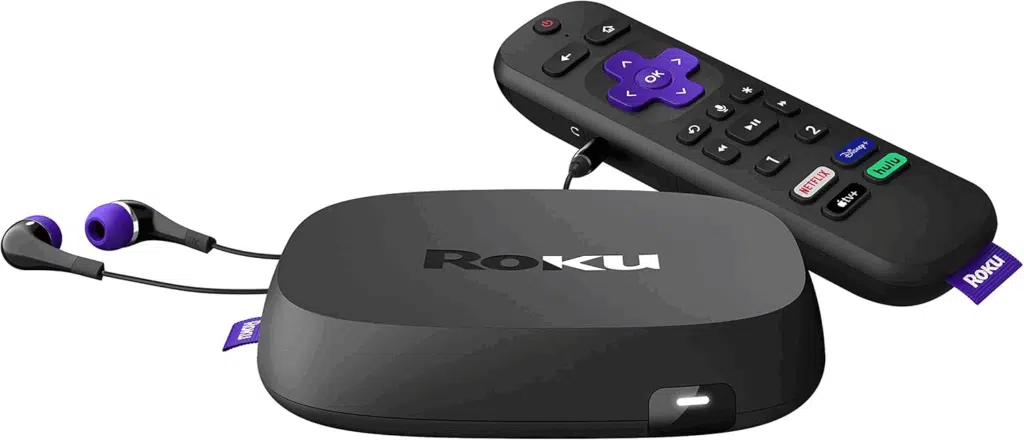
The Roku Ultra is a compact set-top streaming device running Roku OS, known for its user-friendly interface, extensive app support, and advanced features like 4K, HDR, Dolby Vision, and Dolby Atmos. The latest model launched in 2024.
Designed for users seeking premium streaming quality and connectivity, it offers a responsive UI and a rechargeable Voice Remote Pro with backlit buttons and a remote finder.
Features
- Supports 4K at 60 fps, HDR formats, Dolby Vision, and Dolby Atmos audio.
- Powered by a quad-core processor for smooth performance.
- Enhanced Wi-Fi and Ethernet port for stable streaming.
- Voice Remote Pro with USB-C charging, backlit buttons, and lost remote locator.
- Access to Roku Channel and universal search across apps.
- Private listening via headphone mode.
Setup Steps
- Connect power and HDMI to your TV.
- Select the correct HDMI input and follow on-screen prompts.
- Connect to Wi-Fi or Ethernet and update the device.
- Pair the Voice Remote Pro.
- Create or sign in to a Roku account.
- Add channels, adjust display settings, and enable private listening if desired.
Supported Platforms
Supports all major streaming services in your region and offers free ad-supported content via the Roku Channel.
Cost
Available for $79.99 on Roku’s official site.
Pros
- Intuitive UI with universal search and free content options.
- Rechargeable remote enhances usability.
Cons
- Increasing ads and autoplay features on the home screen can be intrusive.
- Box form factor requires visible placement.
- Some versions lack headphone jack on the remote.
Ideal For
- Fans of Roku’s ecosystem and interface.
- Users valuing remote features like private listening and remote finder.
Not Ideal For
- Those seeking a simple, inexpensive streaming stick.
- Users satisfied with built-in TV streaming capabilities.
- Viewers wanting an ad-free home screen experience.
- Google TV Streamer (4K)
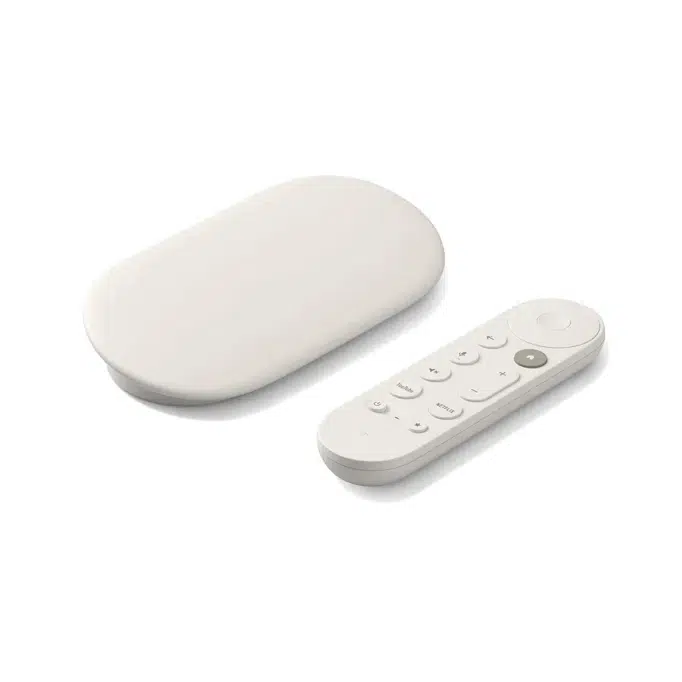
The Google TV Streamer, launched in September 2024, replaces the Chromecast with a compact box design rather than a dongle. It boasts upgraded hardware, including a faster processor, increased storage, and enhanced smart home compatibility.
Running Google TV, it aggregates content from installed apps, offers cross-service search, and supports casting from phones and desktops. The included voice remote features Google Assistant and can display Google Photos slideshows.
Highlights
- 4K HDR output with Dolby Vision and Dolby Atmos support.
- Improved CPU, 4 GB RAM, and 32 GB storage.
- Enhanced Wi-Fi, Ethernet, Bluetooth connectivity.
- Voice remote with customizable button and lost remote alert.
- Thread/Matter smart home integration for seamless device compatibility.
- Wedge-shaped box connected via HDMI cable.
Setup Process
- Connect the streamer to your TV’s HDMI port and power it on.
- Switch to the correct HDMI input to start setup.
- Use the Google Home app on your phone to connect to Wi-Fi, link your Google account, and pair the remote.
- Sign into streaming services or cast content from your devices.
- Optionally, set up profiles, parental controls, and smart home devices.
Supported Services
Supports all major streaming apps natively, with integrated content recommendations and casting capabilities.
Pros
- Significantly more storage than previous Chromecast models.
- Responsive interface with faster app launches.
- Advanced smart home integration with Thread/Matter.
- Ethernet support for stable, high-speed connections.
- Remote improvements including customizable buttons and lost remote finder.
Cons
- Higher price point compared to the discontinued Chromecast.
- Larger and more conspicuous than dongle-style devices.
Price
Retailing at $99.99 on Google Store and Amazon.
Best For
Users deeply embedded in Google’s ecosystem who want smart home integration alongside streaming.
Not Ideal For
- Those seeking a simple, budget streaming device.
- Owners of TVs with native Google TV or Android TV support who don’t need extra ports or storage.
- Onn 4K Plus
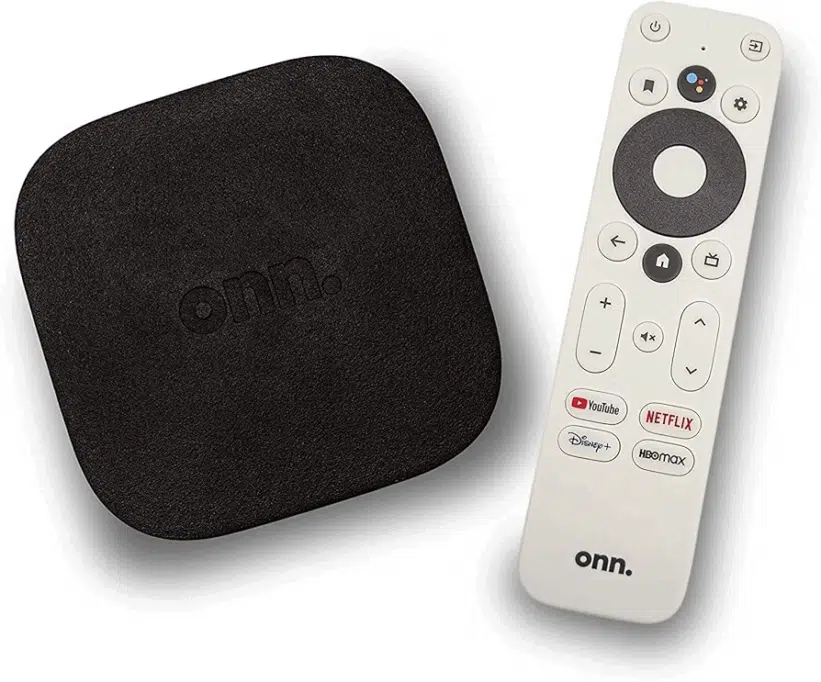
Walmart’s Onn 4K Plus, released in May 2025, offers a mid-tier Google TV streaming experience, positioned between the Onn 4K and Onn 4K Pro models in features and price.
It runs Google TV with native app support and Google Cast, decoding 4K video locally and supporting Dolby Vision and Atmos. While it lacks some premium features, it delivers solid performance for its price.
The Onn 4K Pro variant adds more RAM, storage, a USB-A port, and a remote with a finder function, whereas the 4K Plus boasts a faster processor, Android 14 OS, and double the storage of the base model.
Key Specs
- Powered by Amlogic S905X5M quad-core Cortex-A55 CPU at up to 2.5 GHz.
- 2 GB RAM and 16 GB storage.
- Supports 4K Ultra HD, Dolby Vision, HDR, and Dolby Atmos.
- Wi-Fi 6 connectivity, HDMI output, and USB port; no built-in Ethernet.
- Voice remote with Google Assistant shortcut and dedicated app buttons.
Setup Instructions
- Connect the device to your TV via HDMI and power it on.
- Pair the remote and select your language during setup.
- Connect to Wi-Fi and sign in with your Google account.
- Install or update streaming apps from the Google Play Store.
- Optionally configure Google Home integration, profiles, and parental controls.
Supported Platforms
Supports all major streaming apps available through Google TV and the Play Store, including Netflix, Disney+, Amazon Prime Video, and YouTube.
Pricing
Onn 4K Plus: $29.88 at Walmart.
Onn 4K Pro: $44.73 at Walmart.
Pros
- Offers 4K and Dolby Vision at an affordable price.
- Includes Google TV’s search, recommendations, and casting features.
Cons
- Limited RAM and storage capacity.
- Occasional compatibility issues with Dolby Vision/Atmos on some apps.
- Google TV interface can feel cluttered with recommendations and ads.
Best For
Budget-conscious users who don’t require advanced features like Ethernet, extensive storage, or gaming capabilities.
Not Best For
Power users needing ample storage, heavy gaming, or intensive Android app usage.
Additional Noteworthy Chromecast Alternatives
| Device | Key Features | Price | Advantages | Drawbacks |
| Apple TV 4K | Powered by A15 Bionic chip; available in 64 GB or 128 GB storage; supports 4K, HDR10+, Dolby Vision, Dolby Atmos; USB-C Siri Remote; Wi-Fi 6; Thread and Ethernet on higher-end model. | $129 (Wi-Fi model) $149 (Wi-Fi + Ethernet model) |
Excellent picture and sound quality; smooth UI; seamless Apple ecosystem integration; premium remote features. | Higher price compared to many competitors; limited physical ports on some models. |
| Xiaomi Mi Box S | Android TV with 4K HDR streaming; built-in Chromecast; 2 GB RAM and 8 GB storage; supports major streaming apps and voice assistant; HDMI and Wi-Fi connectivity. | $69.99 on Amazon | Affordable with many features; voice remote; user-friendly interface. | Limited storage; weaker performance for demanding tasks. |
Frequently Asked Questions About Streaming Devices
Do I need a Chromecast if I own a smart TV?
Generally, no. Most modern smart TVs come with built-in apps and casting capabilities. However, an external streaming device can enhance performance if your TV’s OS is slow, lacks apps, or doesn’t receive regular updates.
Which streaming device offers the largest app selection?
Platforms like Roku, Google TV, and Amazon Fire TV provide the most extensive app libraries.
Can these devices be used with older, non-smart TVs?
Yes. Any TV with an HDMI port can use these devices, though output resolution depends on the TV’s capabilities unless the device includes upscaling.
How crucial is 4K support in a streaming device?
It depends on your setup. If you own a 4K TV and frequently watch Ultra HD content, 4K and HDR support are important features to consider.
Final Thoughts: Evaluating the Best Chromecast Alternatives
Each device reviewed was tested in real-world home environments, from initial setup to daily use, including app navigation, casting, and assessing video and audio quality alongside voice control features.
While many streaming devices can effectively replace Chromecast, no single option suits everyone perfectly. Your best choice hinges on the features you prioritize most.
Start by considering your preferred ecosystem-Apple, Google, or Amazon-along with your gaming habits, preferences for video and audio formats, and budget.
My hands-on testing aims to simplify your decision-making, emphasizing that the device aligning with your lifestyle and needs will deliver the best experience, rather than simply chasing the latest specs or hype.
Disclaimer:
This review reflects my independent evaluation and personal opinions, which may differ from others. While I strive for accuracy, I cannot guarantee completeness or error-free content. The information is not investment advice and may change over time. By using this content, you acknowledge its subjective nature and agree not to hold me liable for any outcomes resulting from reliance on this information.